
Posted by Nureva on Oct 9, 2026, 1:27:02 PM
Audio conference systems and video conference systems are often grouped together, but they solve two very different challenges. A video conference system captures and transmits what people see. An audio conference system captures and transmits what they hear. Each type of system has its own components, specifications and impacts on meeting quality. Yet they’re often evaluated and budgeted for as a single solution.
This article explains the differences between audio and video conference systems, why they should be evaluated separately and the key factors to consider when choosing each one.
TL;DR: Audio vs. video conference systems
Audio and video conference systems are both essential pieces of equipment in modern meeting rooms, but they are separate solutions that serve different functions:
-
Video systems capture and transmit the visual signal while audio systems handle microphone pickup, echo cancellation and speaker output.
-
Despite research showing that audio quality has a measurable impact on group collaboration and how talkers are perceived, investment in audio equipment in conference room setup is sometimes overlooked and video equipment is purchased instead.
-
Nureva designs conference room audio systems for organizations that want to close the gap.
What is a video conference system?
A video conference system captures, processes and transmits visual content between in-room and remote participants. The core components are:
-
A camera
-
A display
-
A codec or unified communications (UC) platform, such as Microsoft® Teams, Zoom or Google Meet™.
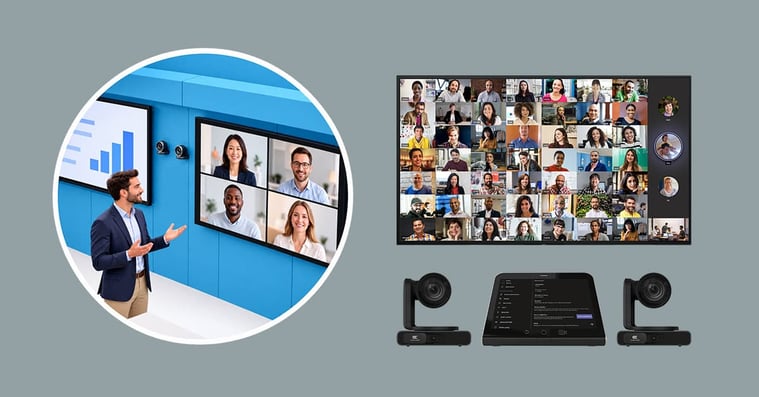
The camera captures the in-room image, the display shows the remote participants and shared content and the codec or software encodes and transmits the video stream.
Modern conferencing cameras often include auto-framing and speaker-tracking features, automatically keeping the active talker in view and switching between individual and group views. The room size determines the right camera. Smaller huddle spaces can be equipped with a wide-angle bar, whereas larger boardrooms and learning spaces typically need one or more PTZ (pan-tilt-zoom) cameras with a wider field of view.
Many all-in-one video options bundle a camera with a basic microphone and speaker. For small rooms with a small number of participants seated close together, this can be adequate. For larger rooms, this setup can make it challenging to capture the right view.
What is a conference room audio system?
An audio conferencing system captures, processes and transmits the voice signal so in-room and remote participants can hear one another. The core components are:
-
Microphones
-
Speakers
-
A digital signal processor (DSP)
Microphones capture speech, speakers reproduce incoming audio and the DSP improves sound quality through acoustic echo cancellation (AEC), noise suppression and automatic gain control.
Microphone configurations vary, but include:
-
Tabletop pucks
-
Ceiling arrays
-
Beamforming microphone arrays
-
Distributed virtual microphone systems
Each takes a different approach to capturing voices in the meeting room or learning space.
With Nureva’s Microphone Mist™ technology, virtual microphones are distributed in a dense grid rather than forming pickup beams. It adapts continuously, including during silent or idle periods, which means the system can recalibrate to changes in the room environment without interrupting meetings or requiring manual reprogramming.
How audio and video conferencing systems differ
| Audio conference system | Video conference system | |
| Primary function | Captures, processes and transmits the voice signal between in-room and remote participants | Captures, processes and transmits the visual signal between in-room and remote participants |
| Core components | Microphones, speakers and often a DSP | Camera, display and codec or UC platform |
| Key processing | Acoustic echo cancellation, noise suppression and automatic gain control | Video encoding and compression, network transmission and display rendering |
| Scales with room size? | Yes, larger rooms require greater microphone coverage and a more capable DSP or Microphone Mist technology | Yes, larger rooms require wider field-of-view cameras, more than one camera and automated camera tracking and switching |
| Can be bundled? | Often included in all-in-one video bars for small rooms, purpose-built for larger spaces | Available as standalone units or bundled into all-in-one video bars |
| UC platform dependency | Connects via USB or network and is compatible with most platforms | Typically requires platform-specific software (Teams Rooms, Zoom Rooms) or certification for full functionality |
| Impact on meeting quality | Determines whether all participants can hear and be heard clearly | Determines whether participants can see each other and share content |
Video systems manage visual communication, while audio systems manage spoken communication. Both are necessary for a functioning conference room, both must be compatible with the same UC platform and both need to be adequate for the room size. Because they serve different functions, they should be evaluated and specified independently.
The most commonly misunderstood conference room solution is the all-in-one video bar. These units bundle a camera with a microphone and speaker, and they work well for their intended use case: small huddle rooms where participants sit within 10 feet (3 meters) of the unit. In larger rooms, a dedicated audio system is the better choice because of the four common limitations of all-in-one systems.
1. Microphone architecture
All-in-one units are typically built with a single microphone array positioned to capture voices in the area directly in front of the unit. As the room size increases and participants are seated farther apart or at angles, the audio coverage can become inconsistent. Purpose-built audio systems are designed to achieve full-room coverage from the outset.
2. Audio processing constraints
The DSP in a video bar is sized and tuned to support an adequate audio experience alongside the camera and codec functions in the same unit. Purpose-built audio systems dedicate more processing resources to audio quality, helping improve echo cancellation, noise suppression and voice clarity with no trade-offs made to accommodate video functions.
3. Manufacturer priority
In many all-in-one devices, camera performance and platform compatibility are major purchasing considerations. Audio capabilities might not be prioritized, leading to inconsistent or unclear sound for in-room and remote meeting participants.
4. Upgrade path
When the audio in an all-in-one system underperforms, the entire unit must be replaced. With a dedicated audio system, it can be upgraded independently without touching the camera or display.
Why organizations underinvest in audio
Video systems produce visible, demonstrable output. And a new display or camera shows an immediate, obvious improvement. The quality of the audio output might be less obvious and often goes unnoticed until issues disrupt a meeting. When they do, the failure is often attributed to the network or the platform rather than to an undersized microphone that cannot reach the back of the room.
Budget cycles reflect this. Displays and cameras are straightforward to specify and justify. Audio tends to be treated as a commodity: a USB speakerphone or the bundled audio in a video bar might be perceived as sufficient.
The impact becomes most noticeable in hybrid meetings. Remote participants are entirely dependent on in-room audio. They cannot compensate for a microphone that does not cover the spot where someone talking is sitting, and they have no way to signal the problem without disrupting the meeting.
What poor audio costs in real meetings
Poor audio has a measurable cognitive cost. When sound is unclear, listeners engage in effortful listening, a documented phenomenon in which the brain devotes cognitive resources to parsing speech rather than processing its content.
Researchers at Carnegie Mellon University and the University of California, Santa Barbara found that audio cues are so central to effective group communication that adding video to a call can actually disrupt the flow of a conversation. Audio-only calls produced more equal turn-taking and better vocal synchrony than video-plus-audio calls, resulting in better group problem-solving.
Effortful listening compounds this effect, competing with comprehension, memory encoding and decision-making.
Audio quality also influences perception. A Yale University study, published in the Proceedings of the National Academy of Sciences in March 2025, found that tinny audio from a poor-quality microphone during video calls lowered listeners’ assessments of a talker’s intelligence and credibility, independent of what was actually being said. For client-facing meetings or high-stakes internal reviews, audio quality affects how participants are perceived, not only whether conversations are intelligible.
What to look for in a room audio system
Conference room audio systems vary significantly in coverage, processing capability and room compatibility. Three factors most directly determine whether a system performs well in practice:
1. Microphone coverage
An audio system must capture voices from every spot in the room, not only those closest to the microphone. Beamforming arrays steer pickup toward active talkers within a defined coverage area. Nureva’s Microphone Mist technology distributes virtual microphones in a dense grid to achieve full audio coverage without dead zones. Room size is the primary consideration: A system designed for a 10-person conference room will not perform adequately in a 25-person boardroom or a 50-person classroom.
2. Echo cancellation and DSP
Acoustic echo cancellation (AEC) prevents in-room audio from the in-room system speakers from being picked up by the microphones and retransmitted to remote participants. Without effective AEC, remote participants hear their own voice echoed back with a delay. Some AEC systems require periodic tuning or recalibration. Nureva’s Microphone Mist technology provides continuous echo cancellation that adapts in real time, including when the room setup changes between meetings.
3. Platform and room compatibility
An audio system must be certified for or compatible with the organization’s UC platform. Certified devices are thoroughly evaluated to ensure predictable mute logic and consistent audio behavior. Room size and acoustic properties, including reverberation time and surface materials, also affect which system is appropriate. Rooms with hard, reflective surfaces such as glass walls or bare concrete require more robust echo cancellation and may benefit from acoustic treatment.
What to look for in a video system
A video conference system should be matched to the room’s size, use case and UC platform:
-
Camera resolution and field of view are the primary specifications. A 1080p camera is a baseline, while 4K improves clarity for remote participants in larger rooms.
-
The field of view should cover the full width of the participant area without distortion.
-
Auto-framing and speaker-tracking features reduce the need for manual control and produce a more natural meeting experience for remote participants.
-
UC platform certification ensures compatibility, support continuity and predictable behavior.
-
Display sizing follows a practical guideline: The display height should be approximately one-fifth to one-sixth of the maximum viewing distance so that both faces and shared content can be seen clearly from the back of the room.
-
Network bandwidth must be confirmed before specifying 4K systems, as they require significantly higher throughput than 1080p.
Making audio and video work together
A conference room system is only as effective as its weakest component. Participants can usually work through blurry or imperfect video. But they cannot effectively participate if they cannot hear or be heard clearly.
The hybrid equity problem sharpens this point. Remote participants experience only what the camera and microphone capture. Poor video is an inconvenience that they can adapt to by requesting a screen share, a closer camera angle or relocation for better connectivity. Poor audio leaves them structurally unable to participate. They cannot hear clearly, cannot raise the issue without disrupting the meeting and are less likely to have their contributions recognized.
The practical implication is to specify and test audio and video independently before the room goes live. Nureva’s audio systems are UC platform agnostic and compatible with any camera or display configuration, making them a good fit for organizations with a new or existing video setup.
Nureva fixes the audio gap in your conference rooms
Nureva® systems are audio-only, meaning they drop into an existing AV environment without requiring a full room refresh. Organizations upgrading from a video bar can keep their camera and display, address the audio gap directly and see an immediate improvement in call quality for both in-room and remote participants.
Nureva’s conference room audio systems are built with Microphone Mist technology, a patented approach that fills the room with thousands of virtual microphones and provides continuous autocalibration. There is no manual calibration, and therefore no scheduled recalibration windows are required, and there is no degradation when furniture moves or room configurations change. The system simply works, meeting after meeting.
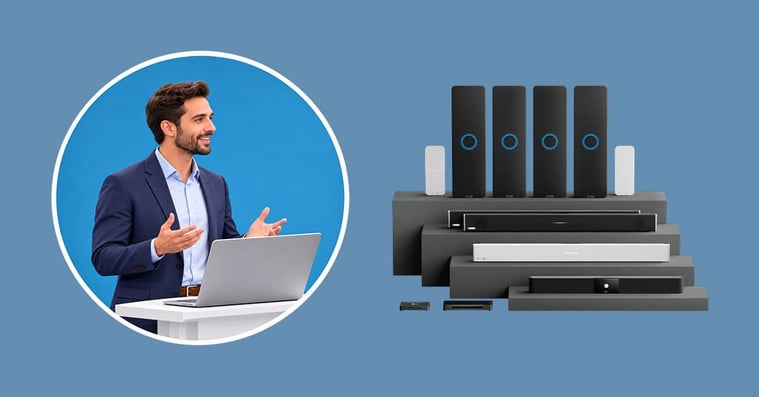
Nureva offers a range of options to make standardization easier:
-
The HDL200 system is well-suited to huddle rooms and smaller meeting spaces.
-
The HDL310 is designed for postsecondary classrooms, large conference rooms and other collaborative spaces.
-
The HDL410 scales up to extra-large meeting rooms and learning spaces.
-
The HDX series handles the most demanding environments, including large boardrooms, training rooms, lecture halls and multipurpose spaces that require full-room audio coverage, full-range speaker output and in-room enhancements like voice lift and assistive listening support.
HDL and HDX systems integrate with Microsoft Teams, Zoom, Google Meet and other major UC platforms, and they work alongside any camera or display setup already in place. The HDL310 and HDL410 systems are certified for Teams Rooms and Zoom Rooms.
Explore Nureva’s conference room audio systems and find the right fit for your room size, layout and platform.
Frequently asked questions
What is the difference between an audio conference system and a video conference system?
An audio conference system captures, processes and transmits voice. It includes:
-
Microphones
-
Speakers
-
Digital signal processing for echo cancellation and noise suppression.
A video conference system captures, processes and transmits visual content. It includes:
-
A camera
-
A display
-
The codec or software platform used to transmit video to remote participants.
The two systems serve different functions, are evaluated against different criteria and must both be compatible with the organization’s unified communications platform. All-in-one video bars bundle audio and video in a single unit but are typically designed for small huddle rooms. Larger spaces generally require purpose-built audio systems alongside dedicated video systems.
Can a video conferencing system replace a dedicated audio system?
Most video conferencing systems, including all-in-one video bars, have built-in microphones and speakers. For small rooms where participants sit in close proximity to the unit, integrated audio may be adequate. For larger rooms, open-plan spaces and rooms with hard, reflective surfaces, a purpose-built audio system typically delivers better microphone coverage, stronger echo cancellation and more consistent voice pickup across all positions. The right answer depends on room size, seating layout and the acoustic properties of the space.
What causes poor audio quality in conference rooms?
Poor conference room audio typically results from one or more of four causes:
-
Insufficient microphone coverage for the room size, leaving participants at a distance with degraded pickup.
-
Inadequate echo cancellation, which allows in-room audio to loop back to remote participants.
-
Background noise from HVAC systems or adjacent spaces that the system cannot filter.
-
Poor room acoustics, such as hard reflective surfaces that introduce reverberation.
Each cause requires a different solution, so identifying the source of the problem is the necessary first step.
What features matter most in a conference room audio system?
The highest-priority features are full-room microphone coverage with no dead zones, acoustic echo cancellation that adapts to the room in real time, noise suppression for filtering background sounds and compatibility with the organization’s unified communications platform. Suitability for the room size is as important as any individual feature: A system matched to a small huddle room will not perform adequately in a larger space, regardless of its other specifications.
Does audio quality affect how talkers are perceived in meetings?
Research indicates it does. A Yale University study published in the Proceedings of the National Academy of Sciences in March 2025 found that tinny audio from a poor-quality microphone lowered listeners’ assessments of a talker’s intelligence and credibility, independent of the content being communicated. Organizations conducting client-facing meetings or high-stakes internal reviews should treat audio quality as a factor in participant perception, not only in whether conversations are intelligible.