
Posted by Nureva on Nov 9, 2026, 12:30:00 AM
Hybrid meetings can fail for many reasons, but one is consistent and largely invisible: audio that does not work properly.
When remote participants cannot hear clearly, they disengage, miss contributions and leave calls with incomplete information. When the voices of in-room participants sound hollow or distorted to those joining remotely, their words carry less weight than they deserve. The result is decisions made on partial input and meetings that need to happen again.
The audio infrastructure is responsible for more than acoustic comfort when you’re on a call. It’s also a major factor in achieving meeting outcomes.
TL;DR: Audio conferencing and productivity
Clear audio shapes productivity, credibility and how effectively people contribute:
-
Poor audio costs hybrid meetings time through repeated explanations, disengaged remote participants and delayed decisions.
-
A 2025 study published in the Proceedings of the National Academy of Sciences found that poor microphone quality leads listeners to judge people talking as less credible, less intelligent and less hirable, regardless of what was said.
-
Audio conference systems that deliver consistent, clear sound from anywhere in a room directly improve the meeting experience.
-
Nureva® audio systems are built for large meeting rooms where conventional speakerphone solutions cannot provide reliable full-room coverage.
What poor audio costs organizations
Poor audio costs organizations time and credibility.
When a hybrid meeting breaks down, the cost shows up as lost time. People repeat themselves, remote participants stop contributing and decisions that should have been made in one session move to a follow-up. Audio plays a central role because remote participants rely on it to follow what is happening in the room.
Research published in the Proceedings of the National Academy of Sciences in March 2025 makes clear the impact of poor audio on people’s perceptions. A team at Yale University ran a series of pre-registered experiments with more than 5,100 participants, presenting identical content in either clear audio or audio degraded to sound tinny and hollow, as a low-quality microphone produces. Across all conditions tested, participants consistently rated speakers in the degraded recordings as less intelligent, less credible and less hirable. The effect held across speaker gender and even when a synthesized voice was used, confirming that the judgment was triggered by the audio quality itself and not vocal characteristics.
The implication for hybrid meetings is obvious. When some participants sound clear and others sound distorted, the audio quality gap becomes a credibility gap.
Contributions from poorly heard participants are not evaluated on equal footing, regardless of their actual content.
For many years it has been understood that poor audio makes meetings worse for the people in the room and those joining remotely:
-
Poor mic pickup = missed input
-
Noise and echo = more cognitive load
-
Distorted audio = lower speaker credibility
-
Poor mic coverage = weaker AI summaries
How does poor audio affect meeting focus?
When the audio is unclear, the brain shifts from automatic speech comprehension to effortful listening: a deliberate, resource-intensive process that diverts working memory from comprehension, retention and decision-making to decode a degraded signal. Listening to unclear speech is cognitively expensive, reducing a person’s capacity to focus on the substance of the meeting.
Research by Norbert Schwarz at the University of Southern California and Eryn Newman at the Australian National University, published in 2018, demonstrated this through experiments using recorded talks and interviews. When identical content was presented with reduced audio quality, listeners rated both the material and the speaker less favorably. Audio degradation did not just make the content harder to hear; it made it seem less credible and less worth engaging with.
We can all appreciate how this effect compounds across a workday. A single meeting with poor audio is a source of friction. Multiple back-to-back conference room calls, where participants work harder to parse speech than to process ideas, produce measurable cognitive fatigue by the end of the day. Poor audio degrades not just the meeting where it occurs, but the quality of attention paid by participants.
Full-room coverage and who gets heard
Full-room microphone coverage happens when an audio conferencing system captures voices clearly from any position in the meeting room, not only from the seats nearest to the audio device. In a large meeting room with a standard speakerphone, participants at the end of the table, or anywhere outside a short pickup radius, are poorly heard by remote attendees. Their contributions arrive muffled, incomplete or missing.
The difference between a conventional speakerphone and a Nureva audio system with full-room coverage comes down to a few key elements:
-
Microphone pickup zone
-
Position sensitivity
-
Autocalibration
-
Suitability for large rooms
| Attribute | Traditional speakerphone | Full-room coverage Nureva audio system |
| Microphone pickup zone |
Near device only | Entire room, all seating positions |
| Position sensitivity |
High. Distance degrades pickup quality. | Low. Consistent across all seats. |
| Autocalibration |
Manual adjustment or not available. | Continuous. Adapts as room conditions change. |
| Suitability for large rooms | Small to medium spaces only. | Large to extra-large spaces. |
A full-room coverage Nureva audio system provides microphone pickup across the space so every voice can be heard clearly. Conventional speakerphones limit pickup to a short radius around the device. Systems with continuous autocalibration maintain coverage as room layouts and acoustic conditions change, without manual adjustment.
For meeting rooms that hold eight or more people, this is as much a participation equity issue as a technical one. As the Yale study on audio quality and perceived credibility indicates, participants whose voices arrive degraded are not only harder to follow but also likely to be judged less favorably.
Why organizations underinvest in audio
Video systems produce visible, demonstrable output. And a new display or camera shows an immediate, obvious improvement. The quality of the audio output might be less obvious and often goes unnoticed until issues disrupt a meeting. When they do, the failure is often attributed to the network or the platform rather than to an undersized microphone that cannot reach the back of the room.
Budget cycles reflect this. Displays and cameras are straightforward to specify and justify. Audio tends to be treated as a commodity: a USB speakerphone or the bundled audio in a video bar might be perceived as sufficient.
The impact becomes most noticeable in hybrid meetings. Remote participants are entirely dependent on in-room audio. They cannot compensate for a microphone that does not cover the spot where someone talking is sitting, and they have no way to signal the problem without disrupting the meeting.
Noise reduction and call clarity
Noise reduction improves call clarity by preventing ambient sound from transmitting alongside voice audio. A typical office meeting room generates noise we don’t necessarily think about, such as:
-
HVAC system sounds
-
Keyboard sounds
-
Hallway activity noise
-
General ambient background noise
Without active suppression, that noise will be heard by remote participants on every call, adding to their cognitive load.
Effective noise reduction operates on several levels:
-
Adaptive systems identify and filter recurring environmental sounds before they enter the audio stream, rather than attempting to suppress them after capture. This approach handles steady-state noise sources, such as HVAC systems and projector fans, more reliably than reactive filtering.
-
Echo cancellation prevents speaker output from reentering the microphone feed, eliminating the feedback loop that causes echo for remote participants on poorly configured calls.
-
Position-based gain control applies different amplification levels to different voices based on their physical location in the room, producing a natural-sounding conversation rather than a flat, undifferentiated signal.
Each of these mechanisms reduces the cognitive overhead that poor audio imposes on listeners, directly addressing the effortful listening problem: Cleaner audio requires less cognitive effort to extract meaning from what’s being said through the signal, leaving more capacity for the actual work of the meeting.
How does audio quality affect AI tools?
AI meeting tools, including transcription, speaker attribution and automated summaries, depend on clean audio input to produce accurate output. When the audio feed from a meeting room is degraded by noise, echo or incomplete microphone coverage, the quality of AI-generated outputs suffers accordingly:
-
Transcription tools convert the audio stream into text.
-
Distorted or inconsistent audio produces errors that carry forward into any summary or list of action items generated from that transcript.
-
Voice attribution, which assigns each statement to the person who said it, requires the audio system to clearly distinguish individual voices.
In rooms with incomplete coverage, talkers at the edges of the pickup zone are harder to identify, leading to misattributions or gaps in the meeting record.
Tools such as Microsoft® Copilot Intelligent Recap and Zoom AI Companion use voice attribution to produce participant-attributed summaries, which is where most of their practical value lies. A summary that accurately records who said what supports effective follow-through. One that misattributes decisions or omits contributions from participants who were poorly heard is of little use.
Organizations that use AI meeting tools without high-quality room audio are limiting the effectiveness of those tools before each call begins. The AI summary is only as accurate as the audio feed that produces it.
Audio in divisible and flex spaces
Audio systems with continuous autocalibration maintain consistent performance as room configurations change, without requiring manual reprogramming. This matters in spaces that serve multiple purposes, such as:
-
Divisible rooms with movable walls or acoustic dividers
-
Training rooms that reconfigure for different group sizes
-
Multipurpose spaces with movable furniture
Traditional audio systems require manual recalibration each time the physical setup changes. A room that divides into two spaces needs two separate calibration events. Rooms that are rearranged frequently require regular IT involvement to maintain microphone performance. Each recalibration takes the room offline and creates the risk that a meeting starts with audio that has not been properly adjusted.
Continuous autocalibration removes that dependency. The system detects changes in room acoustics, when furniture moves or orientation flips, and adapts automatically. In divisible rooms, systems that support both separate operation (each sub-room covered independently) and unified operation (the combined space covered by a single array) can switch between those modes without manual configuration from IT.
The result: Rooms in which the configuration changes regularly do not generate IT support tickets for audio recalibration, and meetings start with audio that works.
What makes a good audio conferencing system?
The most important audio conferencing features to evaluate are:
-
Full-room microphone coverage
-
Continuous autocalibration
-
Platform compatibility
-
Support for AI meeting tools
These four features are necessary for a system to perform reliably in a real meeting room environment, across the full range of scenarios.
Room size rating is often underweighted in system evaluations. The most important step before comparing features or pricing is confirming microphone coverage specifications against the actual dimensions of each room being outfitted. Full-room mic coverage, continuous autocalibration and AI tool support are the features that most directly support meeting outcomes. Platform compatibility determines how well the system integrates with existing IT infrastructure.
| Feature | Why it matters |
| Full-room microphone coverage | Ensures all participants are heard regardless of seating position |
| Continuous autocalibration | Maintains audio quality as room layouts and acoustic conditions change, without manual tuning |
| Noise reduction and echo cancellation | Reduces cognitive load for remote participants by filtering ambient and room speaker sound before it enters the call |
| Platform compatibility | Confirms the system works with Teams, Zoom, Google Meet™ and other platforms already deployed |
| AI tool support (voice attribution) | Enables accurate, participant-attributed summaries from Copilot, Zoom AI Companion, and similar tools |
| Room size coverage rating |
Matches the system’s microphone pickup range to the actual dimensions of the space |
| Installation and setup time | Determines IT resource requirements; simpler installation reduces time to value |
| Remote management and monitoring | Allows IT teams to update and monitor audio systems across multiple rooms without in-person visits |
Get productive with Nureva audio systems
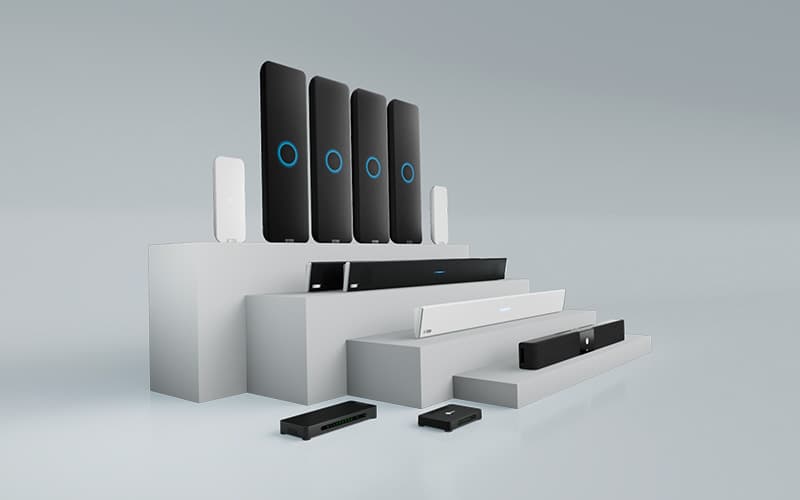
Nureva designs audio conferencing systems for large and extra-large meeting rooms.
- The HDL series uses patented Microphone Mist™ technology to fill meeting rooms and classrooms with thousands of virtual microphones, delivering consistent full-room pickup from every seating position without ceiling mics, DSPs or specialist installation.
-
The HDX series is Nureva’s full-featured audio solution for larger meeting rooms, classrooms and training spaces, offering full-room mic coverage, full-range distributed audio, voice lift, voice amplification and built-in assistive listening in modular configurations that scale to spaces up to 40' x 60' (or 12.2 x 18.3 m).
Fleet management, remote monitoring and device updates are handled through Nureva Console, allowing IT teams to manage multiple rooms without in-person visits.
Full product specifications, system comparisons and UC&C platform integrations are available on our website. For questions about a specific setup, contact the Nureva team directly.
Frequently asked questions
What is an audio conference system?
An audio conference system captures, processes and transmits voice clearly during meetings involving both in-room and remote participants. Unlike a standard speakerphone, an audio conference system covers an entire meeting room using multiple microphone inputs, echo cancellation and noise reduction, so remote participants can hear all in-room voices without anyone moving closer to a device or repeating themselves.
How do audio conference systems improve team productivity?
Audio conference systems improve productivity by reducing the communication failures that degrade hybrid meeting outcomes. Research published in PNAS in 2025 found that poor microphone quality causes listeners to rate the people talking as less credible, less intelligent and less hirable, independent of what was actually said. Systems that deliver clear, consistent audio from anywhere in a meeting room prevent these perceptual distortions and provide the clean audio input that AI transcription tools need to produce accurate results.
What is full-room microphone coverage and why does it matter?
Full-room microphone coverage means an audio conference system captures voices clearly from anywhere in the meeting room, not only from the seats nearest the device. In large rooms, incomplete pickup means remote attendees miss participants’ contributions outside the microphone’s range. Full-room coverage ensures consistent audio capture regardless of seating position, so every participant’s contribution reaches remote attendees with equal clarity.
How does audio quality affect AI transcription and meeting summaries?
AI transcription and meeting summary tools depend on clean, consistent audio capture to function accurately. When audio is degraded by noise, echo or coverage gaps, transcription accuracy drops and AI-generated summaries contain errors or omissions. Systems that support voice attribution, identifying which participant is speaking and passing that data to the platform, allow tools such as Microsoft Copilot Intelligent Recap to produce participant-attributed summaries, reducing the manual correction required after each meeting.
What is the difference between a speakerphone and an audio conference system?
A speakerphone provides limited microphone pickup within a short radius around a single device, suitable for small rooms or individual workspaces. An audio conference system covers meeting rooms of varying sizes, using multiple microphone inputs, speaker outputs, echo cancellation and room-level audio processing to deliver consistent performance throughout the space. Audio conference systems for large rooms offered by Nureva cover areas of up to 30' x 30' (9.1 x 9.1 m) and larger, maintain performance as room layouts change and integrate with enterprise platforms such as Microsoft Teams and Zoom.